Reengineering Project - linkedin/kafka
Target Application
linkedin/kafka is a variant fork of apache/kafka – the version of Kafka that runs in production at LinkedIn.
Kafka was born at LinkedIn. They run thousands of brokers delivering trillions of messages per day, on a slightly modified version of Apache Kafka trunk. The linkedin/kafka repository holds that LinkedIn Kafka release.
Work on the default branch,
3.0-li. That is LinkedIn’s Kafka 3.0 line and the target variant used throughout the course, including Task 2 of the Software Integration lab. Its mainline counterpart isapache/kafka’strunk.
The project at a glance
- Form your team, fork
linkedin/kafka, and establish your development environment – Sections 3 and 4. - Assign 7 PRs to each student from the PR Categories Spreadsheet using the category distribution in Section 2.
- Reengineer your assigned PRs by investigating their repository history and design, attempting integration, adapting where necessary, and testing and validating the results – Sections 2 and 5.
- Complete the required LLM-assisted experiments on selected assigned PRs – Section 6.
- Document your work through three progressive reports and complete the oral exam/presentation.
| Deliverable | Due | Grading |
|---|---|---|
| Pre-conditions Report | Tue. Oct. 13 | 15 pts · Rubric |
| Intermediate Report | Wed. Nov. 4 | 50 pts · Rubric |
| Feedback Session | Mon. Nov. 16 | – |
| Final Report | Wed. Dec. 2 | 100 pts · Rubric |
| Oral Exam / Presentation | Wed. Dec. 9 | – |
The three reports are progressive. The Intermediate Report builds on the Pre-conditions Report, and the Final Report builds on the Intermediate Report. Feedback received at each stage must be addressed in the next submission.
1. Contextualization of the Project
linkedin/kafka is a clone-and-own variant of apache/kafka: it was created by copying and adapting the existing Apache Kafka code. For a while the two systems kept synchronizing their updates. Past the divergence date – 2021-07-06 for the branches we use – they stopped sharing commits, yet both keep evolving actively and in parallel.
Development then becomes redundant and maintenance effort grows quickly. If a bug is found in a shared file and fixed in one variant, it is no longer easy to tell whether it has been fixed in the other.
Timeline of the divergence – apache/kafka:trunk against linkedin/kafka:3.0-li, measured 2026-09-28:
| Event | Date / value |
|---|---|
| Shared history begins – Kafka’s initial check-in to Apache SVN | 2011-08-01 |
The GitHub fork linkedin/kafka is created |
2018-08-31 |
Last shared commit – merge base f29c43bdbb85 |
2021-07-06 |
Commits in linkedin/kafka that are not in apache/kafka |
475 |
Commits in apache/kafka that are not in linkedin/kafka |
9,145 |
You can reproduce every figure above with the GitHub compare API – a technique from the Mining Software Repositories lab:
https://api.github.com/repos/linkedin/kafka/compare/apache:trunk...linkedin:3.0-li
Note how lopsided the divergence is: the mainline has moved on by more than nine thousand commits. Every one of them is a potential fix the fork never received.
Be careful with commit dates. Nearly every LinkedIn commit on
3.0-licarries the committer date2022-06-02T17:08:46Z, while the author dates of those same commits are spread over the preceding months. LinkedIn rebased the branch, and the rebase re-stamped every commit. A script that reads committer dates will therefore report the divergence as 2022-06-02, which is an artifact of rewritten history, not a real event. The true last shared commit is the merge base in the table: 2021-07-06. When you mine this history, prefer author dates – and remember that it is the merge base, not any timestamp, that decides whether a cherry-pick conflicts.
LinkedIn maintains several release lines, and each one left the mainline at a different point:
| LinkedIn line | Diverged from apache/kafka:trunk |
|---|---|
2.4-li |
2019-10-07 |
3.0-li (used in this course) |
2021-07-06 |
3.6-li |
2023-08-20 |
3.9-li |
2024-07-29 |
Note also that linkedin/kafka’s own trunk branch is only a mirror of the mainline – it carries no
LinkedIn-specific commits, so it is not the variant you want. Always work from 3.0-li.
The clone-and-own problem
The figure below illustrates the clone-and-own development model, in which the Target Variant (the forked repository) was cloned from the Source Variant (the original repository) and then maintained independently.
When the Target Variant was forked (fork_date), it inherited all commits from the Source Variant. Between the fork_date and the divergence_date, both variants continued synchronizing commits, keeping their histories aligned. After the divergence_date, synchronization stopped and the two variants began to evolve independently.
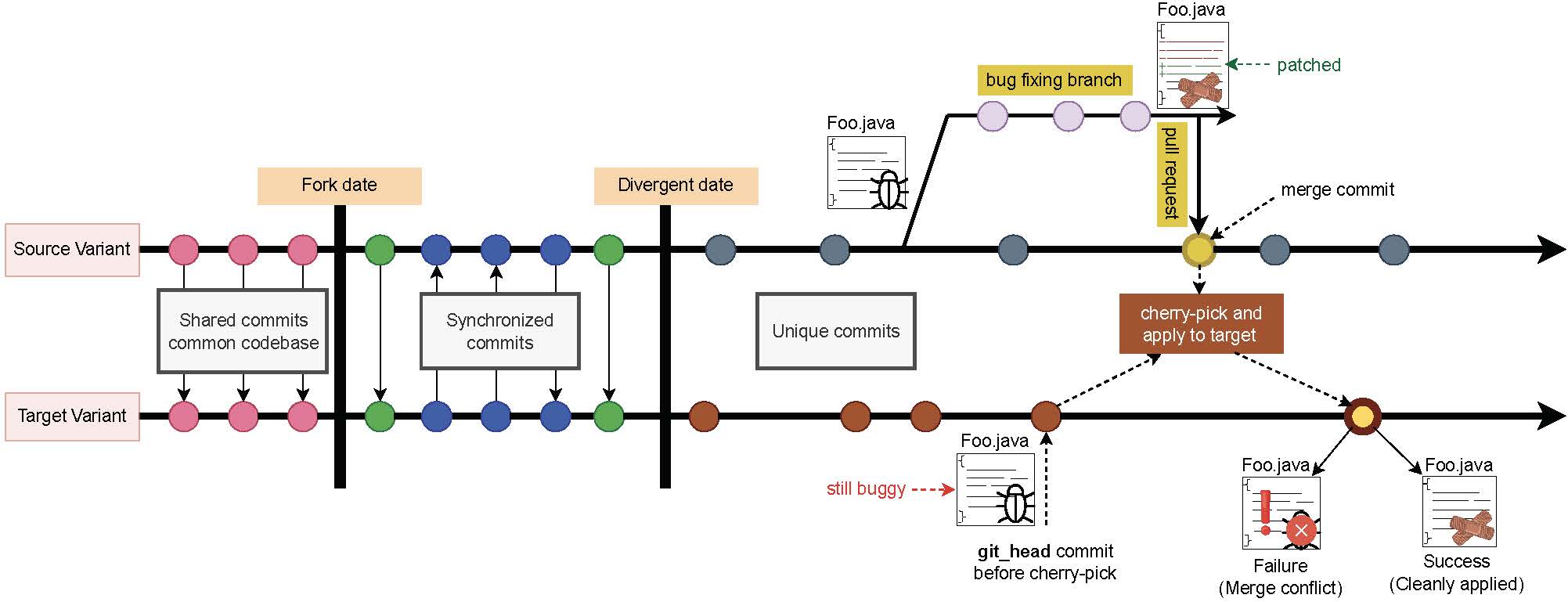
Now assume that, after the divergence_date, a developer on the Source Variant finds a bug in Foo.java.
They create a bugfix branch, apply the patch, and merge the fix into the main branch of the Source Variant through
a pull request.
Later, the maintainer of the Target Variant wants that same fix in the git_head of their repository. Two
things can happen:
- Successful integration. The commit applies cleanly. The patch merges without conflicts and the fixed
Foo.javabecomes part of the target’s codebase. - Failed integration. The commit fails to apply because of merge conflicts in
Foo.java, arising from code divergence, refactoring, or other structural differences accumulated since the divergence_date.
Because the fork has diverged, files shared by a patch may have changed in both variants, so a direct
git cherry-pick often conflicts. Some of those conflicts are purely textual – overlapping edits on the same
lines. Others are structural, caused by refactorings applied independently in each variant: method
renames, class moves, changed interfaces.
The tool: RePatch
This project uses RePatch (the
RePatch-2.0-upgrade branch), which performs refactoring-aware patch integration: it aligns the source
and target around the refactorings it detects, applies the patch, then replays those refactorings so the target
keeps its own structure.
You have already run RePatch in Task 2 of the Software Integration lab, on PR #13386. For the project:
- Reuse that workflow. The lab’s headless path is the quickest route –
repatch <label> <source> <target> <pr>for a single PR, or a CSV batch for several at once. The lab also covers the IDE route and where to read results. - Inspect the results in the RePatch database –
merge_result,conflicting_file,conflict_block,refactoring,refactoring_conflict– and document how each conflict was resolved, or why it could not be. - Connect your observations back to the reengineering patterns in the OORP book.
RePatch is needed only for Categories 3 and 4 below – four PRs in total, the same four the integration lab refers to. Categories 1 and 2 are handled with plain
git cherry-pick.
2. Pull Request Categories
You will work on pull requests from the four categories described below. The specific PRs are listed in the PR Categories Spreadsheet.
Each student is responsible for 7 PRs, distributed across the four categories below. A three-person team will therefore work on 21 PRs, while a four-person team will work on 28 PRs.
| Category | PRs per student | Integration route |
|---|---|---|
| 1 – cherry-pick succeeds, tests exist | 1 | git cherry-pick |
| 2 – cherry-pick succeeds, tests missing | 2 | git cherry-pick + new tests |
| 3 – cherry-pick fails, RePatch succeeds | 1 | RePatch |
| 4 – cherry-pick fails, RePatch fails | 3 | RePatch + manual analysis |
| Total | 7 |
Assign the PRs within your team so that each student receives the category distribution shown above. Decide the allocation early and record it in your report. Although each student is individually responsible for analyzing, integrating, testing, and documenting their assigned PRs, this remains a team project. You are expected to discuss findings, share challenges and solutions, and help one another when difficulties arise during integration, testing, and analysis.
Check the
Replacementcolumn. For some Category 1 and 2 PRs the originally selected pull request turned out to conflict, so a replacement PR is listed beside it. Where a replacement is given, work on the replacement, not the original.
You are expected to collaborate rather than work in parallel silos:
- Discuss your findings, challenges, and approaches together.
- Share insights on conflicts, testing, coverage, design differences, and refactorings – the same underlying issue may affect several PRs.
- Help one another troubleshoot difficult integration, testing, or analysis problems when needed.
- Submit one joint team report consolidating everyone’s contributions.
- Keep each student’s assigned PRs clearly identifiable throughout the report.
Common workflow for every PR
Regardless of category, treat each assigned pull request as a software reengineering case, not simply as a patch to be applied. For each PR, follow the general workflow below:
Understand the change → Recover the source design → Recover the target integration-point design → Identify the design and evolution gap → Attempt integration → Adapt where necessary → Test and validate → Document the outcome
As part of understanding each change, use the techniques introduced in the Mining Software Repositories lab to establish the provenance of each PR. At minimum, record:
- the PR number and URL;
- the merge commit used for the integration; and
- the files changed by the PR.
Where relevant, examine the repository history to help explain the change or the divergence between the source and target variants.
You may obtain this information using Git, the GitHub interface, the GitHub REST API, GraphQL, or scripts. The particular mechanism is your choice. What matters is that you can explain how you obtained the information and provide enough evidence for your analysis to be reproduced.
The amount of work required at each stage depends on the PR category. For example, a Category 1 PR may integrate with little or no adaptation, while a Category 4 PR may stop at the analysis of the design, refactoring, or semantic differences that prevent successful integration. Do not invent adaptation work when none is necessary. Instead, document what you found and explain why the integration was straightforward or difficult.
Category 1: Cherry-pick succeeds and tests already exist
git cherry-picksucceeds without conflicts.- The integrated code is already covered by tests in the target repository.
Tasks:
- Run
git cherry-pickon that merge commit. - Validate the integration by running the existing test suite.
Category 2: Cherry-pick succeeds but tests are missing
git cherry-picksucceeds without conflicts.- Some of the changed files lack tests in the target repository.
Tasks:
- Run
git cherry-pickon the identified merge commit. - Write the missing unit or integration tests for the uncovered changes.
- Measure coverage before and after adding the tests, to show the improvement. See Appendix A for the commands and for the PowerMock caveat.
Category 3: Cherry-pick fails, RePatch succeeds
git cherry-pickfails because of structural divergence.- RePatch resolves the conflicts and integrates the PR.
- The affected files may or may not have test coverage.
Tasks:
- Run RePatch and inspect the integration results to confirm correctness.
- Validate the integration by running the existing test suite.
- If tests are missing, write unit or integration tests for the uncovered changes.
- Measure coverage before and after adding tests – see Appendix A.
Category 4: Cherry-pick fails, RePatch cannot resolve the conflicts
- Both
git cherry-pickand RePatch fail, because of unsupported refactorings or complex semantic or textual conflicts.
Tasks:
- Identify and document the specific reason for the failure – an unsupported refactoring, a semantic conflict, or another complex change.
- Attempt small, targeted manual adaptations, for example updating a method signature or supplying a missing parameter.
- If integration remains infeasible, explain clearly why developer intervention and domain knowledge are required.
- Reflect on the nature of these conflicts and suggest directions for extending or improving RePatch to handle them.
Do not perform extensive redesign solely to force a Category 4 PR to integrate. A well-supported explanation of why integration is infeasible is a successful outcome for this category.
3. Project Setup and Pre-conditions
Before beginning the main reengineering activities, each student must independently validate their development environment and baseline and complete a preliminary analysis of all seven assigned PRs.
Each team must also establish its project coordination process, including a regular weekly meeting, shared meeting minutes accessible to the instructor and TAs, and continued coordination through the team’s assigned Discord channel.
Use the Pre-conditions Report Template on the course main page for the specific evidence and information to report at this milestone. Individual work must remain clearly identifiable even though the team submits one report.
4. General Coding Instructions
Follow these repository and coding practices throughout the project.
Repository setup
- Fork linkedin/kafka for your team and clone the team fork.
- Work from the target branch
3.0-li. - Use JDK 11. See Appendix A.2 for build and environment guidance.
- Each student must independently verify that they can build and test the target variant in the environment used for the project.
One branch per assigned PR
Each assigned PR must be investigated on its own branch, for example:
pr-<PR-No>
Do not combine unrelated PR integrations on the same branch.
Cherry-picking Apache Kafka PRs
Add apache/kafka as an upstream remote and fetch its history before working with the assigned Apache PRs.
For each assigned PR:
- Create a branch from
3.0-li. - Identify the commit associated with the Apache PR.
- Cherry-pick that commit.
- Record whether the integration succeeds or conflicts.
If a Category 1 or Category 2 PR unexpectedly conflicts, abort the cherry-pick and verify the assignment and the Replacement column in the project spreadsheet. Contact the instructor or TAs if the problem remains.
Collaboration and ownership
- Add all team members as collaborators on the team fork.
- Each student should maintain the branches for their own assigned PRs.
- Team members may help one another troubleshoot, but the analysis, integration, testing, and documentation of each PR remain the responsibility of the assigned student.
Commit and push practices
- Commit and push regularly using clear, descriptive messages.
- Keep unrelated activities separate where practical, especially integration changes and test changes.
- Do not wait until the report deadline to push completed work.
The repository history should make it possible to trace the work performed for each PR and identify the student responsible.
5. Development Activities
The activities below define the reengineering work you will perform across your assigned PRs. The report templates specify what evidence must be presented at each milestone and how that evidence should be organized.
The depth of analysis will vary by PR. A straightforward Category 1 integration may require less discussion than a Category 4 PR involving substantial source-target divergence.
I. Design recovery and evolution analysis

- Recover and describe the local design surrounding the change in the source variant.
- Identify the corresponding classes, methods, or components in the target variant, where the change must be integrated.
- Compare the source and target contexts and identify the design/evolution gap that matters for integration, such as renamed or relocated elements, changed interfaces or parameters, refactorings, or redistributed responsibilities.
- Use focused diagrams or annotated structural views where they help explain the design. Include only the classes, methods, and relationships needed to understand the change and its integration.
- If there is no meaningful design/evolution gap, state this explicitly rather than introducing artificial differences.
The goal is not to model the entire Kafka architecture. Recover enough of the relevant design to explain why the patch can or cannot be integrated into the target variant.
II. Integration and design adaptation
Attempt each assigned integration using git cherry-pick. Where applicable, use RePatch when cherry-pick
fails and examine how refactorings or other source-target differences affect the integration.
For successfully integrated PRs, consider the following design progression:
Source design → Target design before integration → Target design after integration/adaptation
Explain how the change fits into the target design and any adaptation required because the variants evolved differently. If no adaptation is necessary, explain why the source change fits the existing target design.
For Category 4 PRs where integration remains infeasible, consider:
Source design → Target design → Design barriers preventing integration
Identify the design, refactoring, or semantic differences that prevent safe integration. The objective is to diagnose the failure, not to perform extensive redesign simply to force the patch to integrate.
III. Refactoring and manual adaptation
Where an integration requires additional work:
- Identify the refactorings or structural differences relevant to the conflict.
- If RePatch cannot resolve the conflict, investigate small, targeted manual adaptations, such as accounting for renamed methods, changed parameters, or relocated functionality.
- Document any adaptation or refactoring you perform and explain why it was necessary.
- If integration cannot be completed safely without developer intent or additional domain knowledge, explain what information is missing and why it matters.
A well-supported diagnosis of why a Category 4 integration is infeasible is a valid project outcome.
IV. Testing and validation
For every successfully integrated PR:
- Run the appropriate target-variant tests and report the results.
- Determine whether the existing tests adequately exercise the integrated change.
- If tests are missing or inadequate, create or adapt appropriate unit or integration tests.
- Where tests are added or modified, compare coverage before and after the test changes using the same measurement scope. See Appendix A.
- If coverage is unreliable because of the build or testing framework, explain the limitation and assess test adequacy using other evidence.
- Re-run the relevant tests after any manual adaptation or refactoring.
Interpret coverage together with the behavior exercised by the tests. Coverage alone is not evidence that the integration is correct.
V. Reengineering reasoning
As you work through the assigned PRs:
- Estimate the effort required for integration and for creating or adapting tests.
- Identify PRs that are exceptional, for example because of unusually large changes, complex conflicts, substantial design divergence, or difficult testing requirements.
- Consider risks to correctness, maintainability, and design quality.
- Identify OORP patterns and maxims that materially inform your design recovery, integration, adaptation, testing, or other reengineering decisions. Explain how they influenced your reasoning rather than simply listing their names.
VI. Team coordination and use of lab techniques
Continue the coordination process established during the Pre-conditions milestone:
- Meet at least once each week and maintain the shared meeting minutes.
- Use the team’s Discord channel for ongoing coordination.
- Discuss progress, technical findings, recurring problems, and blockers.
- Help one another troubleshoot difficult problems while retaining individual ownership of assigned PRs.
- Raise blockers early rather than waiting until a report deadline.
The project should also demonstrate meaningful use of techniques introduced across the five lab areas:
| Lab area | Example tools or techniques |
|---|---|
| Metrics and Visualization | CodeScene |
| Refactoring Assistants | CodeScene, SonarQube, RefactoringMiner |
| Test Coverage | IntelliJ Coverage, JaCoCo, or similar |
| Software Integration | GACPD, RePatch |
| Mining Software Repositories | Git, GitHub REST API, GraphQL, or scripts |
At the team level, demonstrate meaningful evidence from each lab area. Select tools or techniques because they provide useful evidence for the reengineering task, not simply to show that a tool was run.
You are not required to apply every tool to every PR or to have every student use every tool. Explain why the selected techniques were appropriate and what you learned from them.
6. LLM-Assisted Integration and Test Generation
Category 4 is where the existing automation runs out. git cherry-pick fails, RePatch cannot resolve the
conflicts, and Section 2 asks you to
explain why developer intervention is required. This section asks a narrower question:
How far can a small language model, running on your own machine, help close that gap?
The LLM-assisted work is an individual component of the project. Every student completes both parts as part of the overall reengineering process:
- Part A – LLM-assisted patch integration: Apply a local language model to one of your own Category 4 PRs.
- Part B – LLM-assisted test generation: Apply a local language model to one of your own successfully integrated PRs from Category 1, 2, or 3. If your Part A integration succeeds, you may instead use that PR.
The objective is not to demonstrate that the LLM succeeds. The objective is to evaluate systematically and reproducibly how far a locally running code model can assist with these two reengineering activities.
A careful negative result – “I tried this, here is exactly what I provided to the model, and here is where and why it failed” – is a valid result. An uncritical claim that “the LLM fixed it” without verification is not.
Ground rules
The following expectations apply to both parts. They are intended to make the experiments systematic, reproducible, and grounded in the same reengineering principles used throughout the project.
- Individual work. Each student completes Part A and Part B using their own assigned PRs. You may discuss problems with your team, but the experiments, analysis, and reporting must be attributable to the student responsible for the selected PRs.
- Local models only. The point is to see what runs on ordinary hardware without sending source code to a third party. Do not use hosted APIs for these experiments.
- Everything must be verified. Generated code counts only if it compiles and you have run the relevant tests. Nothing is accepted on the model’s say-so.
- Everything must be reproducible. Record the exact model and tag, the full prompts, sampling settings, and
raw outputs, including attempts that failed. Commit these artifacts to your fork under
llm-assisted/. - Report honestly. Hallucinated APIs, invented method names, incorrect assumptions, and confidently wrong patches are findings. Document them.
- Connect the work to reengineering. Identify the OORP patterns that materially influenced your decisions and explain how they were applied. Do not simply list pattern names.
- Disclose model assistance. Clearly identify which parts of your work were produced or modified with model assistance.
- Do not push generated code upstream. Work only in your team fork. Do not submit a pull request containing
generated code to
apache/kafkaorlinkedin/kafka.
6.1 Set up a local model
Ollama is the recommended runner. Install it on your host machine, not inside the RePatch container. The RePatch container already uses substantial memory, and running both inside the same container may cause resource problems.
For example:
ollama pull qwen2.5-coder:7b
ollama run qwen2.5-coder:7b            # interactive check that it works
ollama show qwen2.5-coder:7b           # record tag, digest, and parameters
Choose a model appropriate for the hardware available to you:
| Model | Download | Practical on |
|---|---|---|
qwen2.5-coder:3b |
1.9 GB | 8 GB RAM, no GPU |
qwen2.5-coder:7b |
4.7 GB | 16 GB RAM – recommended default |
qwen2.5-coder:14b |
9.0 GB | 32 GB RAM, or a 12 GB+ GPU |
Other code-oriented model families may also be used, such as deepseek-coder-v2, codellama, or llama3.1.
If your hardware cannot reasonably run the recommended model, select a smaller model and document the reason.
Use temperature 0 for the experiments. The goal is reproducibility rather than creativity.
Record the model, tag, digest, sampling settings, and hardware used. These details must appear in your Final Report.
6.2 Part A – LLM-Assisted Patch Integration [INDIVIDUAL]
Select one of your own Category 4 PRs. This should be a PR for which both ordinary cherry-picking and RePatch have already failed. The purpose is to determine whether the model can help where the existing integration approaches could not.
Step 1 – Establish the baseline
Before involving the model, document what has already failed:
- the
git cherry-pickresult and conflict; - the RePatch result;
- the relevant refactorings identified by RePatch; and
- your analysis of why automated integration failed.
Use the appropriate RePatch evidence, including repatch log and the refactoring and
refactoring_conflict tables where applicable.
You cannot determine whether the model helped unless you first establish what it is being compared against.
Step 2 – Select the context
Do not simply give the model entire Kafka files. Assemble the smallest context that you believe is sufficient for understanding and adapting the change.
At minimum, consider providing:
- the mainline hunk from the source PR, which provides the intent of the change;
- the corresponding method or local code context in the target variant;
- relevant type or method signatures where necessary; and
- a concise explanation of the important source-target design or implementation difference.
Selecting the appropriate context is itself part of the reengineering task. You should be able to explain why you gave the model that context and what you deliberately left out.
This is closely related to Refactor to Understand (OORP, p.127): selecting relevant context requires first understanding the change and its surroundings.
Step 3 – Construct the prompt
The following is a starting point. Adapt it to your PR rather than treating it as a fixed prompt.
You are adapting a patch between two diverged forks of Apache Kafka.

SOURCE (apache/kafka) -- the change to be ported:
<the diff hunk>

TARGET (linkedin/kafka 3.0-li) -- the code as it exists today:
<the corresponding method or local context, verbatim>

The source and target variants have diverged in this area as follows:
<your concise description of the relevant difference>

Produce the edited target code so that it carries the same behavioral change
as the source patch. Preserve the target's existing names, types, design, and style.

If the change cannot be applied safely from the information provided, say so
and explain what additional information you would need.
A model that identifies missing information may be more useful than one that produces a plausible-looking but incorrect patch.
Keep the complete prompt and raw response for every attempt.
Step 4 – Iterate against the compiler
Apply the generated change and compile the relevant module. For example:
export JAVA_HOME=/usr/lib/jvm/java-11
./gradlew :connect:runtime:compileJava      # substitute the module relevant to your PR
If compilation fails, analyze the errors and decide what additional information, correction, or feedback should be given to the model. Record each iteration.
Do not repeatedly ask the model to “fix it” without analyzing the failure yourself.
Report:
- the number of iterations;
- what changed between prompts;
- the compiler feedback provided to the model; and
- whether the process converged, oscillated, or failed.
Step 5 – Verify the result
Evaluate the final result in this order:
- Does it compile?
- Do the relevant existing tests still pass?
- Does the generated adaptation actually preserve the intent of the source PR, rather than merely producing code that compiles?
- Did the model address the particular source-target divergence or refactoring that prevented RePatch from succeeding?
- Did the model introduce unrelated changes, invented APIs, unnecessary restructuring, or other questionable behavior?
Compare the result against the source PR yourself. The language model is not the evaluator of its own output.
Step 6 – Connect the experiment to reengineering patterns
Identify the OORP patterns that materially influenced your Part A work and explain how they affected your decisions.
Do not simply list pattern names. Connect each pattern to a concrete action or decision in the experiment. For example:
- Did Refactor to Understand help you determine the minimum source and target context needed by the model?
- Did Keep It Simple influence how you scoped the integration problem or controlled the model’s changes?
- Did another OORP pattern better describe how you investigated, understood, or adapted the patch?
Use only patterns that genuinely apply to your work. The purpose is to show how reengineering knowledge guided the experiment, not to maximize the number of patterns mentioned.
Step 7 – Report the outcome
In the Final Report, include:
- the selected PR and baseline failure;
- the context you selected and why;
- all prompts and iterations;
- the final generated or adapted diff, if one was produced;
- compilation and test results;
- the number of iterations;
- the relevant reengineering patterns and how they influenced your decisions; and
- your judgement of the result.
Classify the outcome honestly. For example:
- acceptable integration;
- partially useful assistance requiring substantial developer adaptation;
- plausible-looking but behaviorally incorrect patch;
- non-compiling or otherwise unusable result; or
- model correctly identified that insufficient information was available.
A failed integration is a valid result if the experiment and analysis are systematic.
6.3 Part B – Regression Check and LLM-Assisted Test Generation [INDIVIDUAL]
Select one of your own successfully integrated PRs from Category 1, 2, or 3. If your Part A Category 4 integration succeeds, you may instead use that PR.
Part B has two technical steps followed by analysis of the relevant reengineering patterns.
Step 1 – Check for regressions
Before generating new tests, determine whether the integration broke tests that previously passed.
Run the relevant module’s tests. For example:
export JAVA_HOME=/usr/lib/jvm/java-11
./gradlew :connect:runtime:test             # substitute the module relevant to your PR
Compare the results with the same test scope before integration.
Any test that passed before integration and fails afterward is a potential regression. Diagnose the failure and determine whether it indicates:
- a genuine behavioral conflict introduced by the integration;
- a test that encoded assumptions about the target’s previous behavior or structure; or
- another identifiable cause.
Do not proceed to test generation until the relevant test suite is green or until you can explain every remaining failure.
This is Tests: Your Life Insurance (OORP, p.149) in practice: existing tests provide feedback about whether the reengineering activity preserved expected behavior.
Step 2 – Generate and validate tests
Measure the relevant coverage first, following Appendix A, so that you can identify behavior introduced by the integrated change that is not adequately exercised.
Then ask the local model to generate tests targeting that behavior.
Provide sufficient context, including:
- the method or behavior under test;
- an existing test from the same test class or module as a style and framework example; and
- the specific behavior, line, branch, or condition that you want exercised.
The existing test example is important. Parts of 3.0-li use testing frameworks and conventions that may differ
from those a language model assumes by default. Generated tests that use the wrong framework or APIs are not
useful simply because they look plausible.
Keep the complete prompts and raw model responses.
Generated tests must be treated as hypotheses, not accepted automatically. For each generated test that you consider keeping:
- Does it compile?
- Does it pass with the integrated change?
- Can it fail? Revert the integrated change and rerun the test. A useful regression test should distinguish the changed behavior from the previous behavior where applicable.
- Does it test behavior, rather than merely restating the implementation?
- Does it provide useful additional evidence or coverage?
Re-measure coverage using the same measurement scope used before test generation.
Remember the PowerMock limitation described in Appendix A. If coverage is unreliable for the affected class, report the limitation and use other evidence to assess the generated test rather than inventing or misinterpreting coverage numbers.
Keep only tests that survive your validation. Remove tests that are incorrect, redundant, meaningless, or otherwise unsuitable.
Report both:
- the number of tests generated; and
- the number of generated tests you judged usable.
The ratio of generated tests to usable tests is itself an important result.
Step 3 – Connect the experiment to reengineering patterns
Identify the OORP patterns that materially influenced your Part B work and connect them to specific decisions or evidence from the experiment.
For example:
- Tests: Your Life Insurance may explain how the existing test suite was used to detect regressions after integration.
- Write Tests to Understand may apply when designing or evaluating tests for behavior that was initially difficult to understand.
- Grow Your Test Base Incrementally may apply when generated tests were evaluated individually and only useful tests were retained.
- Another OORP pattern may be more appropriate for your particular PR.
Do not merely name the patterns. Explain where and why each pattern was useful, and identify cases where applying a reengineering principle exposed a limitation in an apparently successful LLM-generated result.
6.4 Evidence Required from Each Student
Each student must provide a clearly identifiable LLM-Assisted Integration and Test Generation subsection in the Final Report covering both Part A and Part B.
For each student, report:
- the local model, tag, digest (
ollama show), sampling settings, and hardware; - the PR selected for Part A and the PR selected for Part B;
- Part A: baseline failure, selected context, prompts, iterations, final diff where applicable, compilation and test results, and final assessment;
- Part B: regression results, prompts, generated tests, tests kept and discarded with reasons, and coverage or other test-adequacy evidence before and after;
- the number of generated tests and the number judged usable;
- the reengineering patterns that materially influenced Part A and Part B, with concrete examples showing how they affected your decisions; and
- an honest assessment of where the model helped, where it wasted effort, and where it produced incorrect or misleading output.
Commit the complete experiment artifacts to your team fork under:
llm-assisted/
Organize the directory so that the work of each student and each part can be identified clearly. For example:
llm-assisted/
    <student-name>/
        part-a/
            prompts/
            outputs/
            evidence/
        part-b/
            prompts/
            outputs/
            evidence/
The Final Report should summarize and interpret the experiment. The repository should preserve the detailed prompts, raw outputs, and supporting artifacts needed to reproduce it.
6.5 Team-Level LLM Synthesis
After completing the individual experiments, the team should compare the results across students.
Do not simply repeat each student’s findings. Use the individual experiments as evidence to identify patterns and differences. Consider questions such as:
- Did the local model perform better on some kinds of Category 4 conflicts than others?
- What kinds of source-target divergence were particularly difficult for the model?
- Did compiler feedback help the model converge?
- When the model failed, what were the common failure modes?
- How often were generated tests actually usable after validation?
- What kinds of generated tests were commonly rejected, and why?
- Did the LLM provide useful assistance in cases where RePatch could not?
- Which reengineering patterns were most useful across the experiments, and why?
- Where did applying a reengineering pattern expose a weakness in an apparently successful LLM result?
- Which parts of the process still depended on developer understanding and judgement despite LLM assistance?
The goal is to determine where LLM assistance fits within a broader developer-in-the-loop reengineering process, not simply whether a model can generate code.
6.6 Reengineering Patterns Relevant to the LLM-Assisted Work
The following OORP patterns are particularly relevant to this work, but they are not an exhaustive checklist. Use the patterns that actually apply to your experiment and explain their connection to your decisions and evidence.
- Tests: Your Life Insurance (p.149) – Existing tests provide the regression safety net needed before accepting either an integrated patch or generated code.
- Write Tests to Understand (p.179) – Evaluating whether a generated test is meaningful requires understanding the behavior being tested.
- Grow Your Test Base Incrementally (p.159) – Add surviving generated tests incrementally and validate each one rather than accepting everything the model produces.
- Refactor to Understand (p.127) – Selecting the minimal relevant context for Part A requires understanding the change and the target design before asking the model to adapt it.
- Keep It Simple (p.37) – One carefully investigated PR provides stronger evidence than many generated patches or tests that have not been verified.
7. Reports
The project is documented through three progressive reports. Each report builds on the previous one as your understanding and reengineering work develop.
| Report | Main purpose | Grading |
|---|---|---|
| Pre-conditions Report | Establish the baseline, PR allocation, preliminary understanding, risks, and project plan | 15 points: Grading Rubric |
| Intermediate Report | Demonstrate substantive reengineering progress on at least 4 of 7 PRs per student, including at least one Category 4 PR | 50 points: Grading Rubric |
| Final Report | Complete all 7 PRs per student, complete both LLM-assisted activities, and synthesize the project’s findings | 100 points: Grading Rubric |
These are not three independent reports:
Pre-conditions → Intermediate → Final
Each submission should revise and extend the previous one. Feedback received on one report must be addressed in the next report. Do not simply copy earlier material unchanged when your understanding, results, or conclusions have evolved.
Sections marked [TEAM] in the report templates are completed collaboratively. Sections marked [INDIVIDUAL] must clearly identify and document the work of the student responsible for the assigned PRs.
The grading rubrics distinguish between team-level and individual-level assessment. Team points are shared by the team, while individual points are assessed separately for each student based on their own assigned work and evidence.
The Final Report is the consolidated account of the complete project. It brings together:
- the analysis of all assigned PRs;
- design recovery and adaptation;
- integration, refactoring, testing, and validation;
- application of reengineering patterns;
- techniques and tools used throughout the project;
- LLM-assisted integration and test-generation activities;
- cross-PR and LLM findings;
- team-level synthesis and lessons learned; and
- individual contributions and project coordination.
Read the corresponding report template and grading rubric before preparing each submission. The project instructions define the activities you must complete; the template defines how to report that work, and the rubric explains how the submitted work will be evaluated.
8. General Evaluation
Each project submission will be evaluated using the requirements and evaluation criteria provided for that milestone. Refer to the corresponding Pre-conditions, Intermediate, or Final Report template and evaluation rubric before preparing your submission.
Across the project, we will particularly consider the following:
- Technical correctness: Whether the integration, adaptation, testing, and analysis are technically sound.
- Systematic reengineering: Whether you apply an explicit and well-reasoned reengineering process rather than relying on ad-hoc trial and error.
- Quality of evidence: Whether claims are supported by appropriate repository history, design analysis, tool results, tests, coverage, or other relevant evidence.
- Depth of analysis: Whether you explain why integration succeeds or fails and relate the outcome to the differences between the source and target variants.
- Appropriate use of techniques and tools: Whether techniques from the labs are selected and interpreted meaningfully rather than applied mechanically.
- Application of reengineering patterns: Whether relevant patterns are used appropriately and connected to concrete project decisions.
- LLM-assisted reengineering: Whether each student systematically completes both required LLM experiments, verifies generated results, preserves reproducible evidence, critically evaluates successes and failures, and connects the experiments to appropriate reengineering patterns.
- Individual responsibility and traceability: Whether each student’s assigned PRs and contributions are clearly identifiable and supported by appropriate evidence.
- Team coordination: Whether the team demonstrates steady progress through regular meetings, maintained meeting records, effective communication, and early identification of blockers.
- Team synthesis: Whether the report brings the individual PR analyses together into a coherent account of the reengineering challenges encountered by the team.
- Clarity and reproducibility: Whether another developer could understand what you did, the evidence you used, and how you reached your conclusions.
Refer to the template and evaluation rubric for each submission for the detailed grading criteria.
9. Final Remarks
If you have any questions about the project or the report, please get in touch with the instructor or the TAs.
Appendix A. Measuring Coverage on linkedin/kafka
Categories 2 and 3, as well as the LLM-assisted test-generation activity, may require you to compare test
adequacy or coverage before and after test changes. The coverage lab used Coverage.py on a small Python project;
linkedin/kafka is a large Java and Scala build, so the mechanics are different. This appendix gives you the
working commands and the main limitation you are likely to encounter.
A.1 Coverage is switched off by default
The build only applies its coverage plugins when you ask for them (build.gradle, line 133):
userEnableTestCoverage = project.hasProperty("enableTestCoverage") ? enableTestCoverage : false
So every coverage command below needs -PenableTestCoverage. Without it the coverage tasks do not exist, and
Gradle fails with “task not found” rather than with anything that explains why.
A.2 Build the clone with JDK 11
3.0-li ships the Gradle 7.1.1 wrapper, which predates JDK 17 support. Use JDK 11 for anything you run inside
the kafka clone:
export JAVA_HOME=/usr/lib/jvm/java-11        # path as provided by your container or system
./gradlew -version                            # confirm before going further
JDK 17 is what builds RePatch. The kafka clone is a different toolchain – do not mix them up.
A.3 Scope the run to one module
Two tasks are named reportCoverage, and the difference matters:
| Task | What it does |
|---|---|
:connect:runtime:reportCoverage |
Tests and reports one module. Use this. |
reportCoverage (root) |
jacocoRootReport + core:reportCoverage – runs every test in Kafka. Hours. Avoid. |
For a module, jacocoTestReport already depends on test, so one task does both:
./gradlew -PenableTestCoverage :connect:runtime:reportCoverage
To scope further to a single test class, name the test task so the --tests filter binds to it, then ask for
the report:
./gradlew -PenableTestCoverage \
  :connect:runtime:test --tests "org.apache.kafka.connect.runtime.WorkerSourceTaskTest" \
  :connect:runtime:jacocoTestReport
Substitute the module your PR touches. If you are not sure which module a file belongs to, its path tells you:
connect/runtime/src/main/java/... is :connect:runtime.
A.4 Where the reports land
- Java modules (JaCoCo 0.8.7) – HTML and XML under
<module>/build/reports/jacoco/, for exampleconnect/runtime/build/reports/jacoco/. Openindex.htmlin the HTML directory. :core(Scala) –:coreis excluded from JaCoCo and uses Scoverage 1.4.11 instead. Its report is written tobuild/scoverage/at the repository root, and the task is:core:reportCoverage.
Keep the before report before you overwrite it: copy the HTML directory aside, or save the XML, so you have both numbers when you write the report.
A.5 The PowerMock trap
This is the part that catches people out. The build file says so itself (line 711):
NOTE: Jacoco Gradle plugin does not support “offline instrumentation” this means that classes mocked by PowerMock may report 0 coverage, since the source was modified after initial instrumentation. See https://github.com/jacoco/jacoco/issues/51
3.0-li is a JUnit 4 + EasyMock/PowerMock codebase, so a class mocked by PowerMock can report 0% coverage no
matter how thoroughly you test it. WorkerSourceTaskTest – the class from Task 3 of the
Software Integration lab – is one such test.
If you hit this, do not invent numbers, and do not conclude that your tests are worthless. Report it:
- state which classes reported 0% and that they are PowerMock-mocked;
- cite the limitation above as the cause;
- argue test adequacy another way – which behaviors your new tests exercise, which branches they reach, and what would have to break for them to fail.
That argument is worth more than a percentage. Recognizing that a metric has been invalidated by the way the code under test is built is itself a reengineering result, and the Final Report checklist asks you to discuss the adequacy of the test suite, not merely to quote a number.
A.6 A workable before/after routine
When measuring the contribution of tests:
- Integrate the patch and establish a working baseline with the existing tests.
- Run the scoped coverage command for the affected module and save the report.
- Add or adapt the tests.
- Re-run the same coverage command, using the same module and scope.
- Compare like with like and report exactly which command and scope you used.
This comparison measures what the test changes contributed. Do not compare coverage from different modules, different test scopes, or different code states and attribute the difference solely to the tests.