Mining Software Repositories
Mining software repositories is related to both data mining and reverse engineering. Source control repositories, bug repositories, archived communications, deployment logs, and code repositories are all examples of software repositories that are commonly available for most software projects. The Mining Software Repositories (MSR) field analyzes and cross-links the rich data in these repositories to uncover interesting and actionable information about software systems [Hassan, 2008].
For example, data in source control repositories – traditionally used only to archive code – can be linked with data in bug repositories to help practitioners propagate complex changes and to warn them about risky code based on prior changes and bugs.
In this lab you will mine software repositories, then extract and analyze some of the interesting software artifacts archived in them.
In this session you will:
- create a GitHub personal access token and query the GitHub REST API;
- collect the files of a repository and how often each one was touched;
- link files to their authors and visualize developer activity over time;
- extract pull request data and export it for analysis.
Materials & Tools Used for this Session
Slides
Repositories you can use for the lab experiments
- scottyab/rootbeer
- Skyscanner/backpack (try this one from home – it has very many commits)
- mendhak/gpslogger (try this one from home – it has very many commits)
- thundernest/k-9 (try this one from home – it has very many commits)
Resources for obtaining data from GitHub
- GitHub REST API
- How to create a GitHub token, or use this Generate Token shortcut if you do not want to read the details.
Book
- Object-Oriented Reengineering Patterns (OORP) (Note: OORP, p.xx refers to a page in the pdf version of this book)
Setup / Preparation
The tasks below will guide you through the labs on mining software repositories. In the class slides, we looked at three ways of getting data from GitHub: cloning the repositories with Git, using the GitHub REST API, and using the GitHub GraphQL API. In this lab we will use the GitHub REST API.
- Create a GitHub personal access token by following the tutorial linked above. Each token corresponds to one GitHub account.
- Fork the lab repository johnxu21/msrLab, then clone your fork to have a local copy of the source code.
Tip: never commit your token. Keep it out of the files you push back to your fork.
Task 1: Collecting the Files of a Repository
- Browse the
srcfolder and rename the fileCollectFiles.pyto<your-name>_CollectFiles.py. - Replace the placeholder
tokenin the code with your own token. - Run
<your-name>_CollectFiles.pyand look at the output. The script collects all the files in a repository, together with the number of times each file was touched over its lifetime.
Related Patterns from Object-Oriented Reengineering Patterns (OORP)
- Learn from the Past (p.141) – The change history of a system tells you which parts of it really move. Collecting the per-file touch counts is the raw material for that argument.
Task 2: Linking Files to Authors
A repository contains both source files and other files, such as configuration files. Developers spend most of
their time changing source files, for many reasons: fixing bugs, extending them with new features, or refactoring.
The CollectFiles.py script collects all the files in a repository, so your first job is to adapt it to gather
only the source files. You can find a repository’s programming languages at the bottom right of its GitHub page
(some repositories are written in more than one language).
- First, write a script named
<your-name>_authorsFileTouches.pythat, for each file in the (source-only) list produced by your adaptedCollectFiles.py, collects the authors who touched the file and the dates on which they touched it. - Second, write a script that generates a scatter plot (using
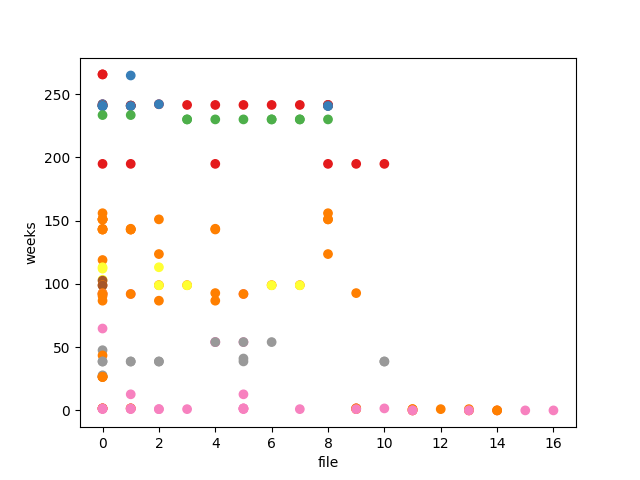
matplotlib) of weeks against files, where each point is colored according to its author. Each author should have a distinct color, so that the plot shows both which files are touched many times and by whom. Name this script<your-name>_scatterplot.py.
This is useful, for example, when identifying refactoring opportunities and deciding which developer should be allocated a task, because they have touched a file many times or have worked on it recently. You can get a hint on how to draw the scatter plot from this Stack Overflow answer.
Example (scottyab/rootbeer)
The repository scottyab/rootbeer has 17 unique source files (.java), touched by a total of 33 authors – these
are the data points in the graph. The scatter plot below shows the authors’ activity over time for this
repository.
Related Patterns from Object-Oriented Reengineering Patterns (OORP)
- Learn from the Past (p.141) – Mining commit histories and author activity lets you base reengineering decisions on evidence rather than speculation.
- Study the Exceptional Entities (p.107) – Heavily modified or unusually widely shared files stand out as potential hotspots for refactoring.
- Tie Code and Questions (p.121) – The visualization answers concrete questions about developer activity and file volatility that matter during reengineering.
Task 3: Extracting Pull Request Data
Write a script to extract data from the following merged pull requests in the apache/kafka repository:
11791, 11686, 11591, 12159, 12073, 11981, 11867, 11991, 12207, 11926, 11847
Read about how to extract pull requests from the
GitHub Pull Request API documentation. For
example, given pull request number 1347 for the repository octocat/Hello-World, the following endpoint returns
a JSON document with the pull request details:
https://api.github.com/repos/octocat/Hello-World/pulls/1347
This Pull request details
spreadsheet is an example of the expected output, for pull requests 11577 and 11686 of
apache/kafka. Store your own output in a .csv file.
Related Patterns from Object-Oriented Reengineering Patterns (OORP)
- Learn from the Past (p.141) – Merged pull requests record how a change was discussed, reviewed, and reworked. That record is evidence about how the system absorbs change.
- Tie Code and Questions (p.121) – Decide what you want to know before you decide which fields to export.
Post-Lab Quiz: Mining Software Repositories
The quiz for this session is posted on WebCampus.
Format: the quiz will include a mix of MCQs and short answer questions (SAQs). At least 4 of the 10 questions will be SAQs. These will require you to:
- run or adapt the scripts you developed in the lab;
- copy and paste small outputs (e.g., top files, author activity, PR data);
- write short explanations based on your results, sometimes connecting them to reengineering patterns.
How to prepare:
- make sure your lab scripts run correctly and produce the expected outputs;
- save or bookmark your key results (CSV, scatter plot, API responses) so that you can access them quickly during the quiz;
- review the patterns used in the lab (Learn from the Past, Tie Code and Questions, Study the Exceptional Entities), since you may need to apply them.